Transpose Setup SWAM| Emeo Digital Sax
Tutorial how to set Transpose on SWAM Saxophones for Emeo Digital Sax.
Why do you need this tutorial for setting Transpose
SWAM Saxophones is not specially written for the Emeo Digital Sax, it is written for all kind of suitable VST-Instruments, meaning you have transpose ability within SWAM Saxophones, but also on the Emeo Digital Sax there are different configurations possible. Meaning if you are connecting your Emeo to SWAM it can give some confusing finding the right tuning of your SWAM VST-Instrument.
In this tutorial I will write down my findings how you can set the transposion in a correct way
Step-by-Step Guide
- On your Emeo Sax there are three key tuning range options available: Eb, C and Bb
You can set this by going into the command mode of your Emeo, select the High E key if you want Eb key tuning range, select Bb key if you want Bb key tuning range or in rare occasions you might set it to C with the C-key.
Note: Alto and Baritone are Eb-key instruments and Soprano and Tenor are Bb-key instruments.
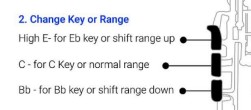
- Check the LED on your Emeo Sax, green=Eb / amber=C / red=Bb
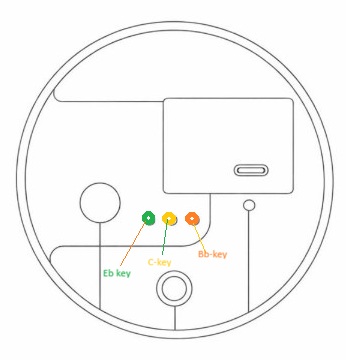
Check the Key indication LED
- Now open your SWAM Saxophone VST-Instrument and adjust the Transpose setting according the below table.
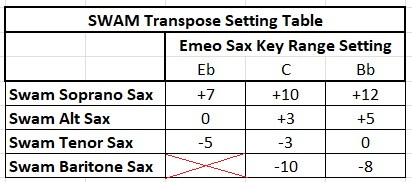
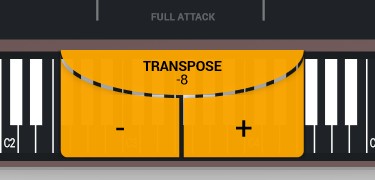
Now your SWAM is set in the right way, it will sound correctly when you practice
This tutorial is based on real-world use of the Emeo Digital Sax. Results may vary depending on firmware, drivers, and software versions.
Ask a Question